Motion Lights Explained: Types, Uses and How to Choose
Learn how motion lights work, which sensor and light types suit each use, and how to place, buy, troubleshoot and use them safely at home.
You're carrying groceries up a dark path, fumbling for keys, and the porch light you left off to save power stays off. Or you left it on all evening, and it's been burning for nobody. Motion lights exist to solve that exact waste and that exact darkness, but only if you treat them as a small control system, not a gadget you screw in and forget. Get the sensor, timer, or aim wrong and you'll lose both the savings and the safety you paid for.
Table of Contents
- What Motion Lights Are and Why They Matter
- How Motion Lights Detect Movement and Switch On
- Motion Light Uses for Security, Outdoor, Accent and Events
- Buying Factors for Range, Sensitivity, Power and Smart Features
- How to Place and Install Motion Lights
- Troubleshooting False Triggers, Short Timers and Dead Lights
- Safety and Privacy Checks Before Your First Install
What Motion Lights Are and Why They Matter
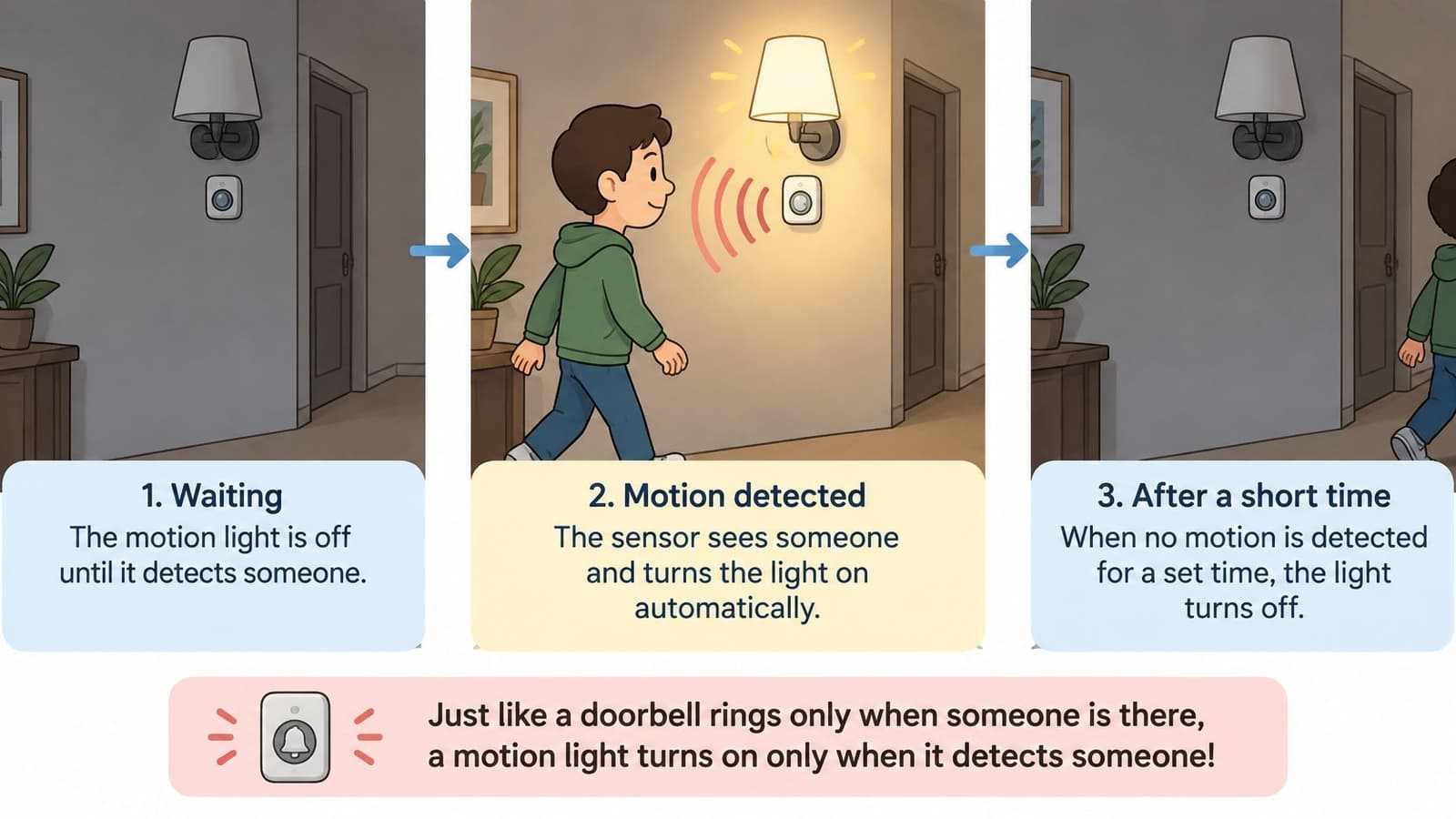
A motion light is a lamp paired with a sensor that switches it on when it detects movement and off again after a set timer. It works like a doorbell that watches the path. It doesn't wait for a button press. It waits for someone to walk into view, announces them with light, then goes quiet again.
Say you cross your driveway at night. First, the sensor detects movement. Second, it tells the lamp to switch on. Third, the timer holds the light on while you unload the car. Fourth, when no new movement arrives before the timer ends, it switches off. That four-part cycle repeats in every product, from a battery puck in a closet to a mains floodlight over a garage.
The Five Parts on Every Box
- Sensor: Watches for movement and decides when to trigger.
- LED lamp: Produces the light. Its brightness and color shape how useful that light feels.
- Driver: Powers the LED safely from mains, battery, or solar charge.
- Timer: Controls how long the lamp stays on after the last detected movement.
- Light-level threshold: Blocks activation when daylight's already bright enough.
That last part confuses people. The threshold isn't the motion sensor. It's a separate light check, so the lamp doesn't waste power at noon just because someone walked past.
Why It Matters in Daily Use
Motion lights remove wasted light in spaces people pass through rather than stay in, such as halls, porches, garages, and side paths. They also make an approach visible. A sudden light at a side gate or rear door doesn't guarantee security, but it removes comfortable darkness for an intruder and alerts people inside.
They help most when your hands are full or your footing's uncertain. Steps, uneven paths, and entrances stay lit for someone carrying a load, a child, or moving slowly at night, without hunting for a switch.
A motion light isn't an occupancy sensor for a room where you sit still. If you stop moving, its timer can still expire and leave you in darkness.
That distinction matters for offices and living rooms. Occupancy systems try to keep light on while someone's present, even seated. A basic motion light only knows that something moved recently. Once you can name the sensor, lamp, driver, timer, and threshold on a box, you can predict what it'll do before you mount it.
How Motion Lights Detect Movement and Switch On
The lamp gets the attention, but the sensor decides whether motion lights behave well or annoy you every night. Two sensing methods dominate, and they fail in opposite ways.
The diagram below separates the two approaches before you compare products.
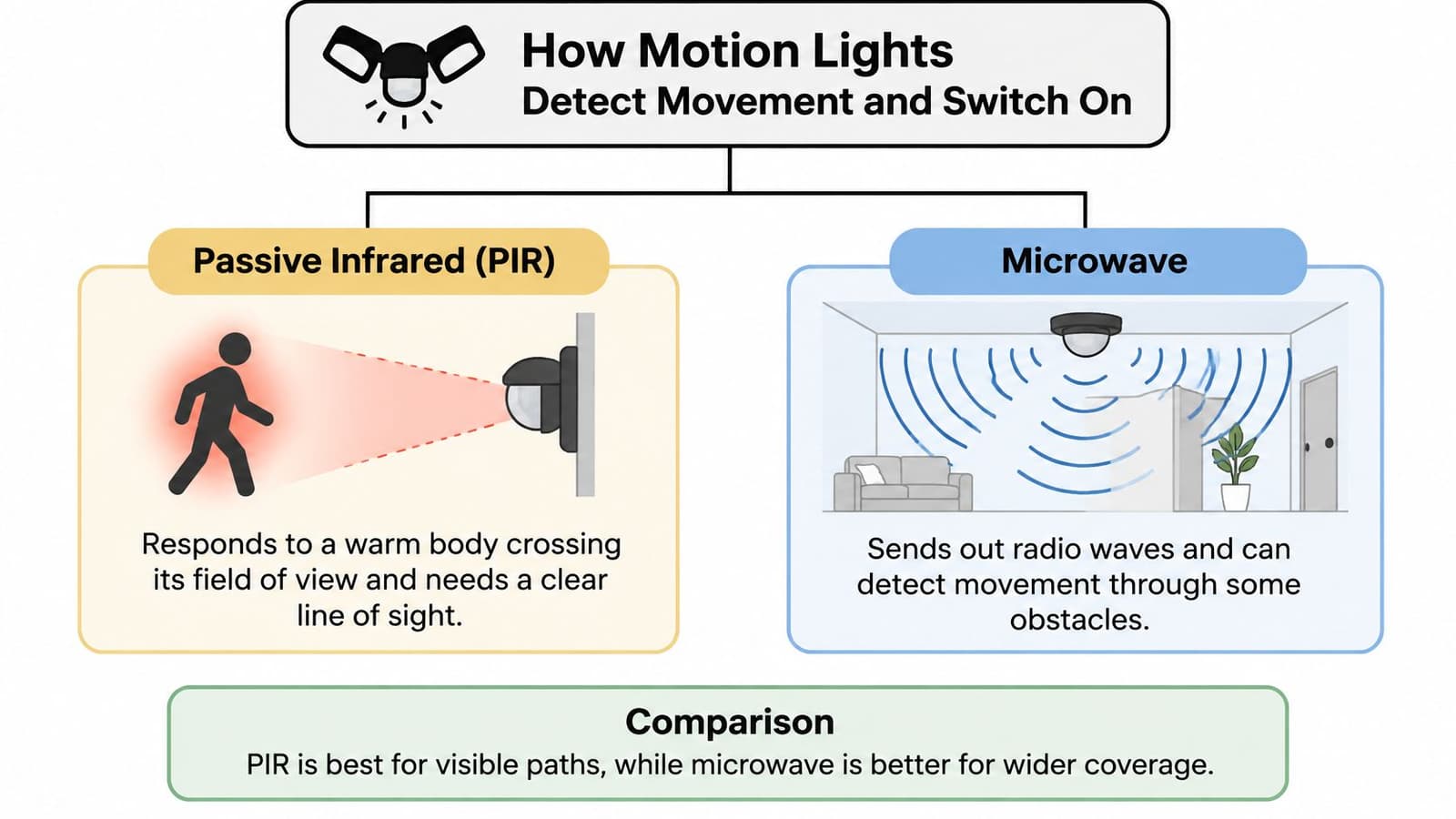
Passive infrared, or PIR, sensors detect rapid changes in infrared radiation as a person crosses their field of view, so they require an unobstructed line of sight and are less reliable through walls, glass, or dense foliage, according to the Meteor Electrical guide to PIR and microwave sensor installation. That guide also notes microwave sensors emit radio-frequency energy and detect changes in reflected signals, can cover awkward layouts and detect fine movement, but may extend beyond the intended zone and cause nuisance activation.
In plain terms, PIR needs to see a warm body cross its zones. Microwave sends out low-power radio energy and reads the returning signal. PIR suits porches, paths, and hallways where the route's visible. Microwave suits garages and corners, but it can trigger through a thin wall or glass door when nobody's in the lit area.
| Sensor type | How it detects | Main strength | Best for | Main weakness |
|---|---|---|---|---|
| PIR (passive infrared) | Heat change from a moving body | Low cost and low power | Porches, paths, hallways | Needs line of sight; weak through glass |
| Microwave | Radio signal reflected from movement | Covers corners and irregular layouts | Garages, corridors with corners | Can trigger through walls and glass |
| Dual-technology | PIR and microwave must both agree | Fewer false triggers | Driveways, pets, sunlit areas | Higher price and more setup |
| Photocell (ambient light sensor) | Measures daylight level | Stops daytime activation | All outdoor fixtures | Detects light, not people; pair with a motion sensor |
Dual-technology sensors require both PIR and microwave to agree before switching on. That cuts false triggers from heat shimmer, pets, or passing movement behind glass, but you'll pay more and spend longer tuning both parts. The photocell isn't a motion detector at all. It only measures ambient light and blocks daytime runs.
If you want the camera and alarm side of detection explained in the same plain terms, the guide to motion sensing by Wisenet Security is a useful companion before you mix lights with recording devices.
Matching Lamp Types to the Job
- LED floodlights: Bright, wide beams for driveways and rear doors where visibility matters most.
- Low-lumen wall or post lights: Softer output for paths and steps, enough to walk by without glare.
- LED strips: Thin, warm light for stairs, cabinets, and closets where a bulb won't fit.
- Battery puck lights: Temporary or rental-friendly light for shelves, tents, and cupboards.
- Smart bulbs with built-in motion: Screw-in convenience, but range stays limited by the fixture's position.
Watch how detection zones behave when someone walks across them, not just toward them, in this short demonstration.
Choose the sensor for the route and obstacles first. Then choose brightness. A powerful lamp with the wrong sensor will still miss people or trigger all night.
Motion Light Uses for Security, Outdoor, Accent and Events
A driveway floodlight that stays on after a car passes wastes power. A stair light that switches off before someone reaches the landing creates a hazard. The right motion-light setup depends on what people do in the space, not just the fixture.
For security, use a bright floodlight at driveways, side gates, and rear doors. Aim it to reveal an approach early, and set a hold time long enough for someone inside to notice or for a camera to record a clear face or vehicle. For outdoor paths, choose lower output at porch steps and garden paths. The goal is to guide feet without glare or light spilling into a neighbor's bedroom.
Accent lighting has a different job. Warm strips in closets and under cabinets can come on instantly, stay dim, and use a 30- to 60-second hold. Stairs need a longer timer so people can finish climbing before the light switches off. For events, garden parties, marquees, and patios benefit from longer holds, which keep guests from being plunged into darkness between trips indoors. Battery fixtures also avoid cables across grass.
What the Energy Evidence Actually Shows
In a 2020 study of a university building, motion-controlled lighting in underground parking saved 39.5 watt-hours per square meter per day, a 77.6% reduction in lighting energy. Lecture rooms saved 25.0 watt-hours per square meter per day, or 32.4%; dormitories saved 142.4 watt-hours per square meter per day, or 28.2%.
The comparison points to occupancy as the key factor: spaces that sit empty for long stretches have more opportunity to save energy than rooms in near-constant use. A busy kitchen, for example, should not be expected to match the parking result. False triggers and an overly long timer can also keep a light on when nobody needs it, cutting into the savings.
| Use case | Typical placement | Fixture and output | Typical timer |
|---|---|---|---|
| Security | Driveways, side gates, rear doors | LED floodlight, high-lumen wide beam | 3 to 10 minutes |
| Outdoor paths | Garden paths, porch steps | Low-lumen wall or post light | 1 to 3 minutes |
| Accent | Closets, under cabinets | Warm white LED strip, low brightness | 30 to 60 seconds |
| Event | Garden parties, marquees, patios | Battery pucks or sensor string lights | 5 to 15 minutes |
| Hallways and utility | Basements, garages, laundry rooms | Neutral LED panel or bulb | 1 to 5 minutes |
Outdoors, mounting angle, shielding, and keeping beams within your boundary often matter more than adding brightness. These outdoor lighting tips from Lighthouse Energy Services cover those placement details.
Choose the use first, then match the timer to how long people need the light. A short hold on a driveway may switch off before someone reaches the door; a long hold in a closet keeps the light on after the task is done.
Buying Factors for Range, Sensitivity, Power and Smart Features
Use the table as your checklist in the shop or online listing. If a product page won't tell you its timer range, threshold control, or power needs, that's information too. You're being asked to guess at the controls you'll live with.
| Factor | Typical value | What to check |
|---|---|---|
| Detection range | 6 to 12 m (20 to 40 ft) | Walk-test the real path, not the box claim |
| Mounting height | 2 to 2.5 m (6.5 to 8 ft) | Matches the height used for the rated range |
| Sensitivity | Low, medium, high | Start medium; step down if it triggers on traffic |
| Timer | 10 seconds to 15 minutes | Longer for stairs and slow walkers |
| Light-level threshold | Set in lux or as day and dusk | Blocks daytime activation without stopping the light at dusk |
| Power source | Mains, battery or solar | Mains for floodlights; check battery life in your climate |
| Smart integration | Wi-Fi, Zigbee or Matter | Confirm hub requirement and offline operation |
The Two Factors Buyers Get Wrong
Range comes first. The figure on the box is a lab result, usually measured with a person crossing the sensor at the ideal height and angle. Your path may force people to walk straight toward it, pass behind a shrub, or approach from below. A generous rating can still leave a blind spot at the exact step where you need light. Judge coverage by walking your route, not by the largest number in the listing.
Timer comes second. Choose it from the task, not the factory default. A very short hold suits a guest passing a porch. It doesn't suit someone carrying a suitcase up steps, unloading shopping in two trips, or helping a child out of a car. If you have to wave at the sensor to keep the light alive, the timer's wrong for that job, however efficient it looks on paper.
Practical rule: Start sensitivity at medium. High catches traffic, blowing shrubs, and animals. Low misses slow walkers who need the light most.
Power and Smart Features Without the Hype
Mains power suits floodlights and permanent installs because brightness doesn't fade as a battery drains. Battery units suit rentals, sheds, and hard-to-wire corners, but check expected life against cold weather and how often the light will trigger each night. Solar only works where the panel gets real direct sun. A shaded north wall won't charge it, whatever the box promises.
Smart integration adds schedules, app alerts, and dimming scenes. It also adds a network to secure and sometimes a hub to maintain. Before you pay for Wi-Fi, Zigbee, or Matter, confirm one thing. Does the lamp still switch on from its own sensor when the internet's down? Local switching is the core job. The app is optional.
Weigh these factors by your situation. A renter lighting a closet needs battery life and a short timer. A homeowner lighting a driveway needs range, weather sealing, and a sensor that won't watch the street.
How to Place and Install Motion Lights
Good placement beats extra range every time. Work through these steps in order, because each one prevents a specific failure you'll otherwise chase later with sensitivity dials.
The sequence below shows the same order as a visual checklist for the wall or garage.
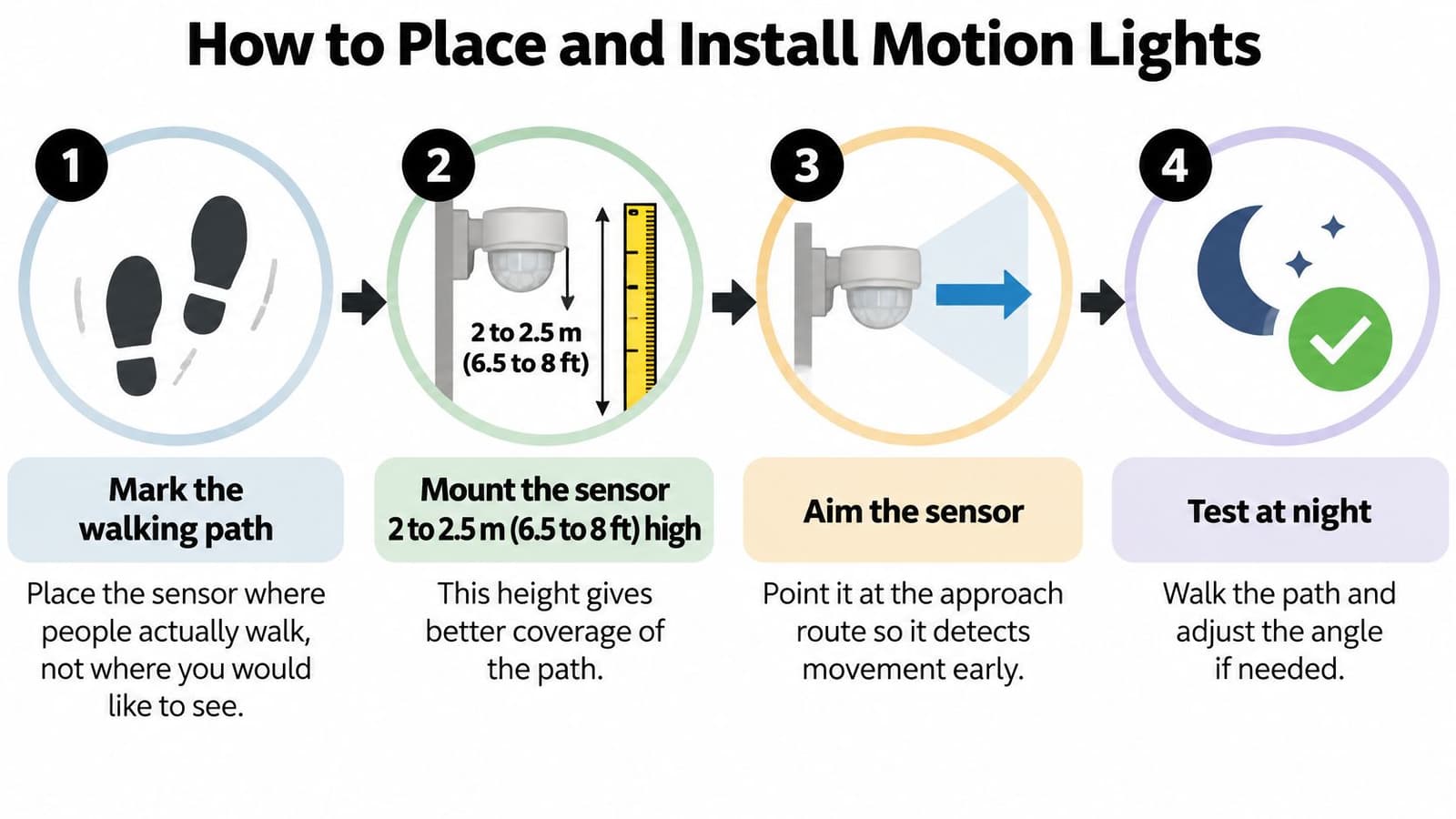
- Mark the walking path. Stand where people enter, walk, and turn. Place the sensor to cover that route, not the view you'd like from a window.
- Mount at the tested height. Fix the sensor about 2 to 2.5 m (6.5 to 8 ft) high unless your manual says otherwise. Mount much higher and people shrink in its zones. Mount lower and pets and shrubs fill them.
- Aim across the path. Point coverage so people cross the detection zones side to side. Crossing movement produces a stronger signal than walking straight toward the lens.
- Avoid heat and airflow. Keep away from HVAC outlets, radiators, exhaust fans, and direct sunlight. Hot or cold changes can look like movement to the sensor.
- Clear the field. Trim vegetation inside the detection area and move reflective objects that bounce heat or light into the lens. A swinging branch will trigger all night in wind.
- Set threshold, sensitivity, and timer. Block daytime activation with the light-level control, start sensitivity at medium, and set the timer for the slowest realistic trip through the zone.
- Walk-test after dark. Walk the nearest and farthest points, approach from each side, and walk slowly. Note dead spots where the light comes on late or not at all, then re-aim before you tighten everything.
Overlapping Zones on Long Routes
One sensor rarely covers a long walkway or staircase without a gap. Overlap two detection areas so the second catches you before the first lets go. That overlap is what stops the light dropping out mid-step.
Correct coverage is also where savings come from. A lighting-management manufacturer cites savings of up to 60% under EN 15193-based conditions in the Legrand lighting management sensors guide, while emphasizing overlapping detection areas so occupants don't enter blind spots. Too little coverage switches lights off on people still present. Too much microwave sensitivity detects movement in the next room and keeps them on for nobody.
If your install sits alongside cameras, plan cable routes and viewing angles together so lights don't wash out the image, a layout point explained in PeakFriend Security's home installation guide.
A finished install feels boring in the best way. The light's already on before you reach the dark stretch, it stays on while you're there, and it doesn't fire when a car passes on the street. If you notice it working, something's probably mis-aimed.
Troubleshooting False Triggers, Short Timers and Dead Lights
Most faults come from three root causes. The sensor sees the wrong thing. The timer ends too early. Or the light never gets a chance to start because of power, threshold, or range. Diagnose by symptom before you replace the unit.
Published guidance reports that lighting controls can reduce lighting energy use by 10% to 90% or more depending on the space, in the Better Buildings wireless sensors guidance. That wide range should warn you. A sensor firing on traffic or shrubs can keep restarting its timer and run for long stretches each night, wiping out the saving you expected.
| Symptom | Likely cause | Fix |
|---|---|---|
| Light switches on at night with nothing there | Sensor reads traffic, heat or moving shrubs | Lower sensitivity, re-aim across the path, trim vegetation |
| Light stays on all night | Reflections, sunlight or animals in the field | Clear reflective surfaces, lower sensitivity, switch to dual-technology |
| Light goes off while still occupied | Timer too short or coverage gap | Extend timer to 1 to 5 minutes; add an overlapping sensor |
| Light never switches on | Light-level threshold too low, dead battery or out of range | Check threshold, replace battery, walk-test the zone |
| Light flickers | Loose wiring, low voltage or incompatible dimmer | Check connections and remove the dimmer from the sensor circuit |
Measure Instead of Guessing
Count activations per night for a few nights. Note roughly how long the light runs and what was moving each time, even if it's only wind, a cat, or headlights. Then change one variable, such as sensitivity, aim, or timer, and count again.
Change one setting, test for a week, then decide. Changing aim, sensitivity, and timer together tells you nothing about which one fixed it.
That's the contrarian point many listings skip. Motion lights aren't automatically efficient. A poorly aimed unit facing traffic can run nearly all night and use more energy than a manual switch you'd have turned off. The opposite error is just as bad. An aggressive short timer saves power and creates dark gaps on steps.
Maintenance keeps a good zone working. Wipe the sensor lens and any solar panel every few months, replace batteries before cold weather if nightly runtime falls, and clear branches after storms before they become nightly triggers. On smart units, install firmware updates, then disconnect the network once and confirm the lamp still switches on by itself.
Safety and Privacy Checks Before Your First Install
Getting a light to turn on is the easy part. What happens when it turns off decides whether it helps or strands someone on stairs, an uneven path, or at an entrance with their hands full.
The checks below start with that shutoff moment, not with detection range.
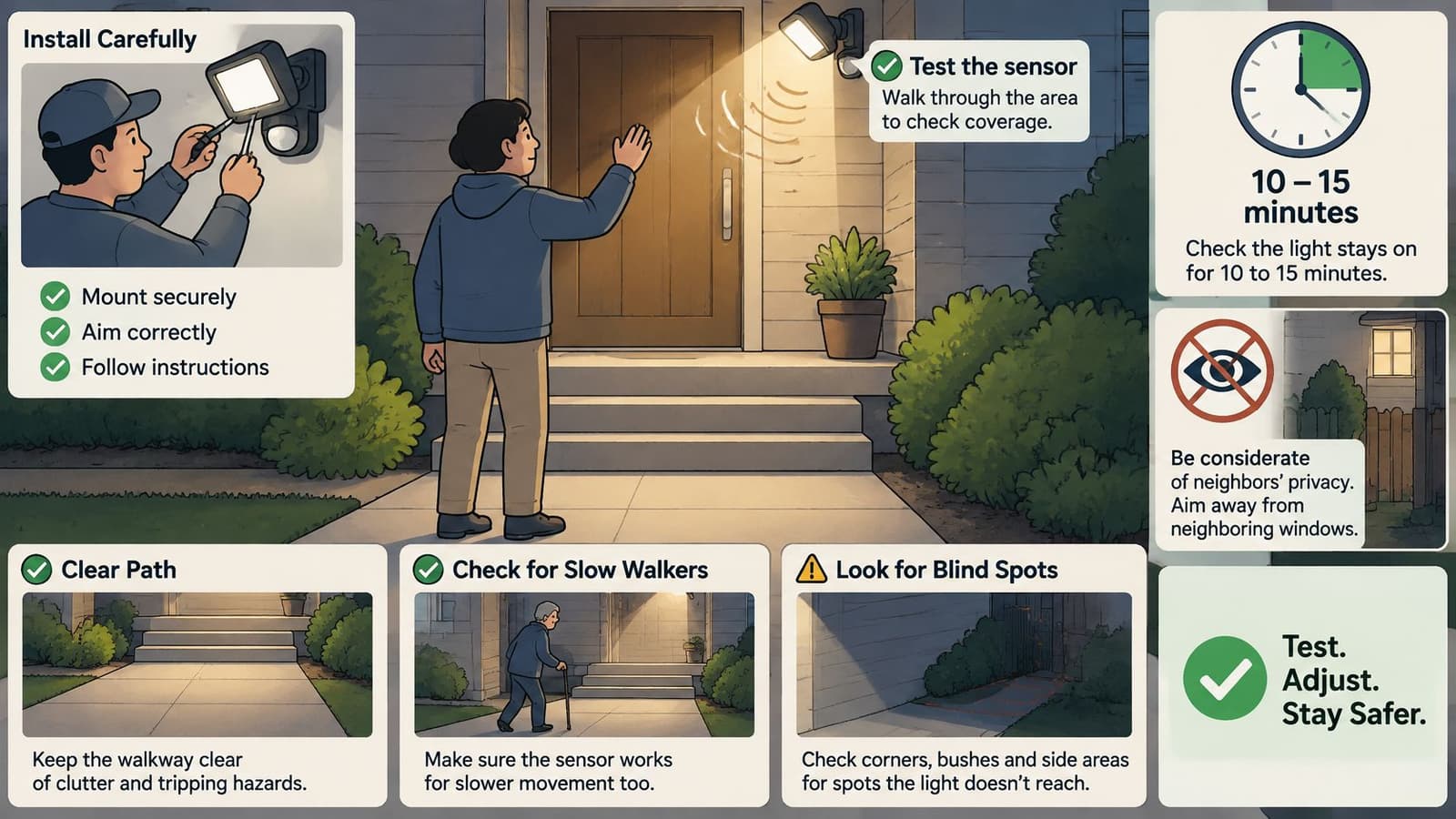
Commercial guidance describes automatic deactivation after 10 to 15 minutes of inactivity, but does not establish whether that timeout is safe for slow walkers, people carrying packages, children, or wheelchair users, as noted in a University of Vermont engineering poster on lighting controls. That poster also reports that false alarms cannot be guaranteed away. You can't design a stair light on the assumption that detection will be perfect.
Never Stranded in Darkness
- Use a longer timer on stairs and entrances: Give the slowest person time to finish the route without hurrying.
- Overlap two sensors: Coverage shouldn't drop between zones halfway down a flight.
- Keep a low standby level where risk is high: Dim wayfinding light beats full darkness between triggers.
- Fit a manual override by the door: Someone should be able to force the light on when they're working, loading, or unsure.
Separate deterrent floodlights from wayfinding lights in your thinking. A floodlight can be aggressive and brief because its job is to expose an approach. A wayfinding light must be dependable because its job is to get your household home safely. Maximum watt-hour savings can conflict with accessibility. Optimize total risk, not just energy.
Privacy and glare need the same plain check. A basic sensor stores little, but smart models send motion events to an app and create a record of comings and goings. Use a unique password, install firmware updates, and put smart lights on a separate network segment from phones and cameras where your router allows it. Aim floods downward, add shields, and keep beams out of bedroom windows, yours and your neighbors'.
Finish with a household walk test. Walk the route at the pace of the slowest person who'll use it, carrying what they'd carry. The lamp should already be on before the first step and stay on until they're clear. If it doesn't, fix the timer or overlap now, not after someone falls.
If you've been testing how motion changes the feel of a space, you can do the same with a favorite still photo, turning one frame into a short living clip for a birthday, anniversary, or memorial tribute. Photo for Video lets you add a short line describing the gentle movement and tone you want, then receive a polished video in minutes with uploads auto-deleted after 7 days. Visit the site to try a guided demo and see real family examples before you create your own keepsake.